The Safety Net
The Closed Loop
Here's the pattern that makes automated testing work:
- Write acceptance criteria: you already know how (Given/When/Then from Lessons 1 and 2)
- Ask AI to generate tests: hand your criteria to your AI coding assistant
- Run the tests; they fail: the feature doesn't exist yet, so the tests correctly report failure
- Ask AI to implement the feature: now AI builds, guided by the tests and your criteria
- Run the tests; they pass: the feature works, verified automatically
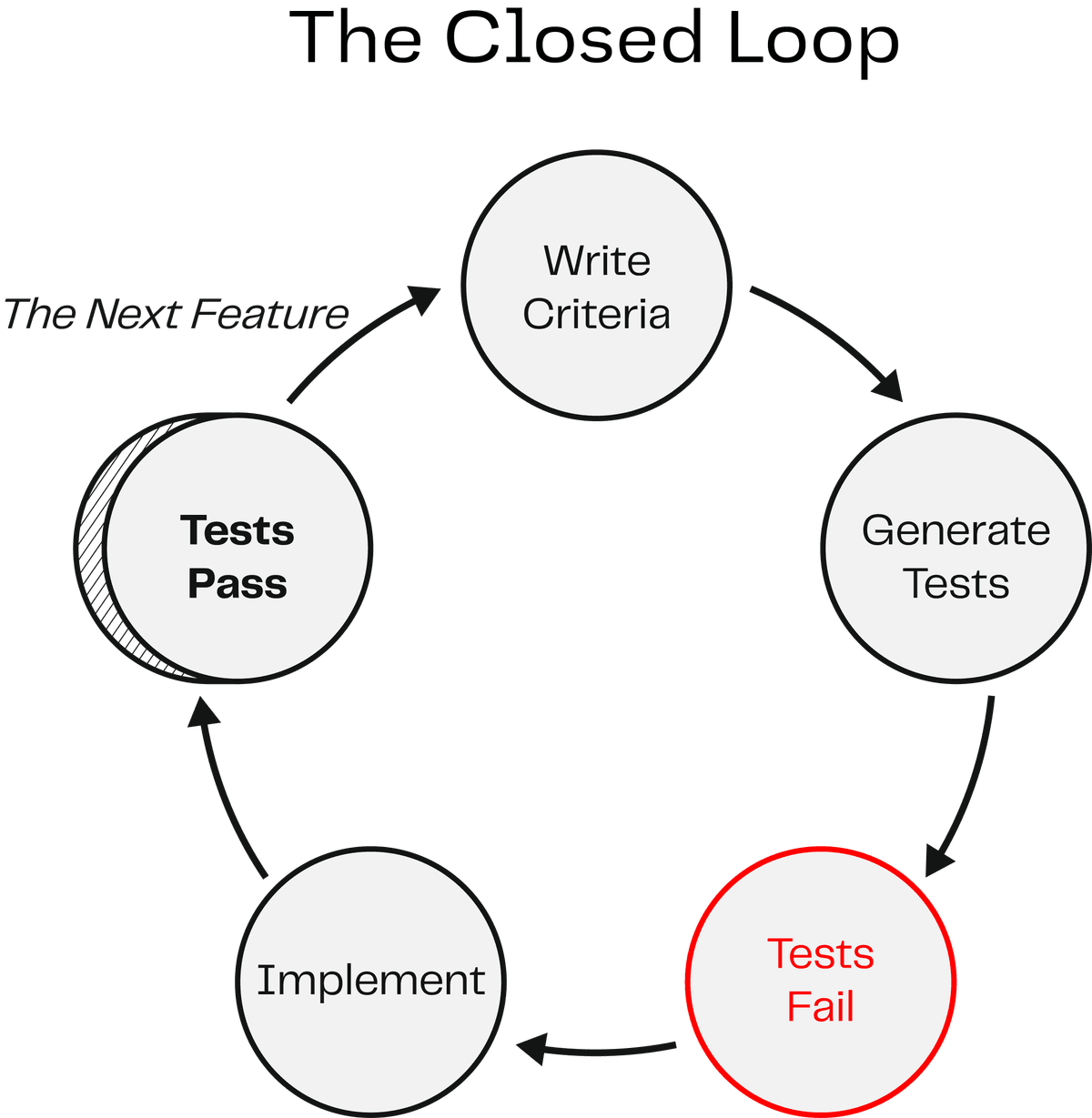
This is the closed loop: criteria drive tests, tests drive implementation, implementation satisfies criteria. The loop closes because the same acceptance criteria that defined "done" also verify "done."
If this pattern sounds familiar to any engineers on your team, it should. This is test-driven development (TDD), one of the most respected practices in software engineering, originating from Extreme Programming (XP) and agile development methods. The classic rhythm: write the test first, watch it fail (red), write the code to make it pass (green), then clean up. Engineers have practiced this for decades.
What's changed is who does what. In traditional TDD, the developer writes the test AND the code. In your workflow, you write the acceptance criteria, AI writes the test, and AI writes the implementation. The discipline is the same: define success before you build. The difference is that AI handles the translation from criteria to code on both sides. You're practicing real software engineering, with AI as your delegate.
This also explains why tests are the best feedback mechanism for AI. Any objective, deterministic signal (a test that passes or fails, a linter that flags or doesn't) tells AI exactly what to fix. Vague feedback like "make it better" leaves AI guessing. A failing test with a clear error message doesn't. The more specific the signal, the better AI responds.
Here's where the safety net appears: once those tests exist, they run every time. Build a new feature next week? Your existing tests still run. Refactor shared code? Tests catch anything that breaks. That's the difference between a point-in-time check and a permanent record of what "done" means.
Generating Tests from Your Criteria
The pattern is straightforward. You start with an acceptance criterion you've already written, hand it to your AI coding assistant, and ask it to write a test that verifies that behavior. You point it at the real data in your repository so the test uses actual values, and define what a failure looks like. AI generates the test. You don't need to read the test code. You can ask AI to explain what it wrote in plain English: what's the setup, what's the action, what does it check? If the explanation matches your acceptance criterion, the test is doing its job. If it doesn't, push back, just like you'd push back on any delegate who misunderstood the contract.
You'll do this hands-on in the team activity below.
The quality of your tests depends on the quality of your criteria.
Vague acceptance criteria produce vague tests. Specific criteria produce specific tests. Everything you practiced in Lessons 1 and 2 (the Three Pillars, the Given/When/Then format, tight acceptance criteria) directly determines how good your automated tests are. The skill compounds.
Automating What You Did by Hand
In Lesson 2, you did manual review: you opened the application, clicked around, filled in data, navigated between pages, and checked each acceptance criterion pass or fail. You were the tester. That worked, but it took time, and every time you add a feature, you'd need to re-check everything again to make sure nothing broke.
What you're doing now is handing that work off to a machine. There are testing frameworks that can do exactly what you did: open the application, click buttons, fill in fields, submit forms, navigate to another page, and verify that the right things show up. Anything you could write down as a list of steps for a person to follow, a test can automate. What took you five minutes to check manually, the machine runs in a second or two. And it can run every single time you make a change to your application.
This is how you build real confidence. As you add features and write new code, your automated tests verify that everything still works. They don't forget steps. They don't skip checks because they're in a hurry. If you have a test for it, the machine runs it, every time, exactly the same way. The more tests you have and the more scenarios you cover, the less likely it is that bugs slip through undetected.
One important thing to understand: automated testing is not AI. It existed long before AI assistants could write code. Tests are standard code automation, deterministic programs that follow the steps you specified and check the results. Your AI assistant knows how to write this kind of code, so you can delegate the test-writing to AI, but the tests themselves run as straightforward, repeatable automation.
Notice something about the acceptance criteria you've been writing. They already describe what a real user does: "Given I'm on the form, when I select a type, then these fields appear." "Given I submit a record, when I navigate to the display, then I can see it." You've been writing test specifications this whole time, in the language of a user, not in the language of code. Hand those criteria to your AI coding assistant, and it can generate tests that simulate exactly that workflow.
One thing to know: AI is non-deterministic. If you just say "write tests," it will decide on its own what kind of tests to write, and it may not choose the approach that simulates a real user. Be specific. Tell it you want tests that open the application, interact with it the way a user would, and verify the result. Your acceptance criteria in Given/When/Then format already give AI everything it needs to do this. AI may also write additional tests behind the scenes at other levels of detail, and that's fine. What matters is that your user-level acceptance criteria are being verified the way a real person would experience the application.
You specify what. AI handles how.
You don't need to understand the test code, the testing frameworks, or the different layers of testing that AI might choose to write. Your job is to write clear acceptance criteria that describe what a user does and what should happen. AI's job is to turn those into automated checks. If the tests pass, the behavior you specified works. If they fail, you know exactly which criterion broke and can give AI a specific fix target.
Generate Your First Tests
Mob Session | ~6 minutes total | One person drives, everyone else navigates.
Rotate the driver. Pick someone who hasn't been at the keyboard recently.
Pick acceptance criterion 3 from Lesson 2:
Given I select a sanctioned vessel, when its AIS broadcast name differs from its OFAC-listed name, then both names are visible so I can see the mismatch.
Step 1: Generate. Ask your AI coding assistant to write a test for this criterion. Point it at the real data files so it uses actual MMSIs and vessel names.
In Your AI Assistant
Your AI assistant will create a test file and write the test code. It reads your project structure to match existing patterns.
Your AI assistant will create a test file and write the test code. It reads your project structure to match existing patterns.
Your AI assistant will create a test file and write the test code. It reads your project structure to match existing patterns.
Your AI assistant will create a test file and write the test code. It reads your project structure to match existing patterns.
Step 2: Verify the intent. You don't need to read the test code. Ask AI to explain what it wrote:
Explain this test in plain English.
What's the Given (setup), the When (action), and the Then (check)?
Does the explanation match your acceptance criterion? If not, tell AI what's off and have it regenerate.
Step 3: Run. Execute the tests:
Run the tests.
The test will probably pass, since you already built and manually verified this feature in earlier challenges. That's a good sign: it means the automated test agrees with your manual review. If it fails, that's actually valuable too. In test-driven development, a failing test means you now have a safety net in place, ready to catch this issue and any future regressions around it. A failure tells you exactly what to fix, and once it passes, you know the safety net is working. Either outcome moves you forward. If the test fails with errors that seem unrelated to your feature (missing files, timeouts, configuration issues), that's an environment problem, not something you did wrong. Tell your AI assistant: "This error doesn't seem related to my acceptance criterion. Help me fix it."
Discuss: Consider a vaguer acceptance criterion: "sanctions screening should work correctly."
Imagine walking up to a coworker and saying, "Verify that the sanctions screening is working correctly." They wouldn't know where to start. Correctly according to what standard? Should they check that sanctioned vessels are flagged? That non-sanctioned vessels are not flagged? That name mismatches are detected? That the OFAC entry details are complete? That vessels sanctioned under different programs (SDGT, IFSR, SYRIA) are all captured?
The same specificity that matters when communicating with a human matters when communicating with AI, and it matters when writing tests. What you really want is a reproducible, step-by-step checklist: what would you need to tell that coworker to do in order to verify it's working? You need to tell your AI assistant the same thing. That's where acceptance criteria come in: they give specific, actionable instructions for what working software looks like.
Now look at the four acceptance criteria from Lesson 2. Each one specifies a scenario (given/when) and a verifiable outcome (then). Each one is something you could hand to a coworker or an AI assistant and they would know exactly what to check. That is the connection between good criteria and good tests: the work you put into writing specific acceptance criteria pays off directly when it is time to verify.
Save your progress:
Save my progress and sync it.
Making TDD the Default
Team Discussion | ~5 minutes total
You just experienced writing an automated test from an acceptance criterion. In test-driven development (TDD), you write the test before you implement the code, so the safety net is in place from the start. Every feature you build this way adds to your safety net, and every line of code your AI assistant writes is covered. The goal now is to make that the default, so you're not walking your AI assistant through the steps manually every time. In Challenge 3, you'll have a whole backlog of stories to work through.
Discuss these questions in order:
-
If you handed your AI coding assistant a new user story right now, would it automatically follow the TDD cycle (writing a failing test first, then implementing, then verifying)? Or would it jump straight to building?
-
You've learned two tools for shaping how AI works: project context files (Lesson 1) and skills (Lesson 2). How could you use one of those to make the TDD cycle the default, so your AI coding assistant follows red-to-green every time you give it a new story without you spelling out the steps?
-
What would you put in that instruction? Think about the steps you just practiced.
Now do it. Before you leave this section, add the instruction to your project context file. Ask your AI coding assistant:
Add this to our project context file:

When implementing a user story,
always write a failing test from the acceptance criteria first,
then implement until the test passes,
then run the full test suite to check for regressions.
This takes 30 seconds and ensures your AI assistant follows the TDD cycle automatically in Challenge 3.
Save your progress:
Save my progress and sync it.
Your project context file tells the AI what to do. As you advance, you'll learn that your tools can also be configured with automatic checks that run every time the AI edits a file or finishes a task, so the rules are enforced even if the AI forgets the instructions.
In Your AI Assistant
In Open Code, automated checks are implemented through plugins: JavaScript or TypeScript modules that subscribe to events like tool.execute.before (before a file edit) or tool.execute.after (after a task completes). Other AI coding tools have similar enforcement mechanisms with different names and configurations.
In Claude Code, these automatic checks are called hooks: shell commands or AI-graded prompts that fire on events like PreToolUse (before a file edit) or PostToolUse (after a task completes). Other AI coding tools have similar enforcement mechanisms with different names and configurations.
In Antigravity CLI, these automatic checks are called hooks, configured in .gemini/antigravity-cli/settings.json. Hooks fire on events like BeforeTool (before tool execution) and AfterTool (after tool execution). Additional events include SessionStart, SessionEnd, BeforeModel, AfterModel, BeforeAgent, and AfterAgent. Hooks use a JSON on stdin/stdout protocol for communication. Other AI coding tools have similar enforcement mechanisms with different names and configurations.
In Codex CLI, these automatic checks are called hooks, configured in .codex/config.toml (project-level) or ~/.codex/config.toml (user-level). You can also use .codex/hooks.json. Hooks fire on events like PreToolUse (before a file edit) and PostToolUse (after a task completes). Note: hooks are disabled by default in Codex. Enable them with [features] hooks = true in your config.toml. Non-managed hooks are flagged for user review and tracked by hash. Other AI coding tools have similar enforcement mechanisms with different names and configurations.
This is just the beginning
What you've learned here is enough to get started, but testing is a deep field. There are tests for performance (can your app handle heavy traffic?), accessibility (can a visually impaired person read the text in your app?), security, and more. You don't need to know about any of that right now. What's also worth knowing: automated tests are great at checking behavior and functionality, but they won't tell you if your layout looks off, if colors clash, or if something just feels wrong on screen. For that, it's still worth opening the app yourself and looking at it. A quick manual pass through the application after a round of changes catches the things that automated tests were never designed to catch.
Key Insight
You've been building toward this: the acceptance criteria you write define what "done" looks like, and now those same criteria become automated tests that verify your application the way a real user would. What you did manually in Lesson 2 (clicking through the app, checking each criterion pass or fail) is now handled by the machine, in seconds, every time you make a change. The more tests you add, the stronger your safety net becomes. AI generates the tests from criteria you already wrote. You don't need to read or understand the test code; you just need to verify that AI's plain-English explanation matches your intent. When you make TDD the default (test before you implement), every feature you build adds to that safety net automatically.